|
FAQ
about the WOWsieLand Lounge
Back to The Main Lounge Page
When I clicked the
PREVIEW button and tried to go back, my post was gone. What happened?
What do all those symbols mean at the top of every post?
I can't get the SMILIES page link to work. What am I doing wrong?
What information is required to post?
Why can't I use HTML anymore?
Why does my smilie go to the end of the post?
AGCode Questions:
I don't understand AGCode. What is it?
What is the code to make a link to a website?
What is the code to make insert an image?
What is the code to make an email link?
What is the code for BOLD and Italics?
What are some common mistakes I might be making?
Is AGCode case sensitive?
Q) When I clicked the PREVIEW button and tried to go back, my post was gone. What happened?
A) Your Internet Explorer security or privacy settings prevent Preview from enabling. If
your Internet Explorer security is set to High you will not be able to use Preview. Also,
if your Internet Explorer privacy is set to Block Cookies or High you will not be able to
use Preview. BACK TO TOP
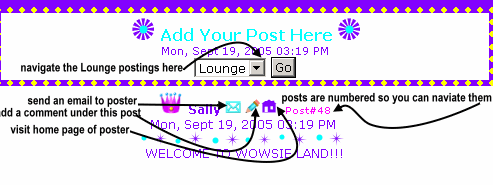
Q) What do all those symbols mean at the top of every post?
See the explaination below:
|
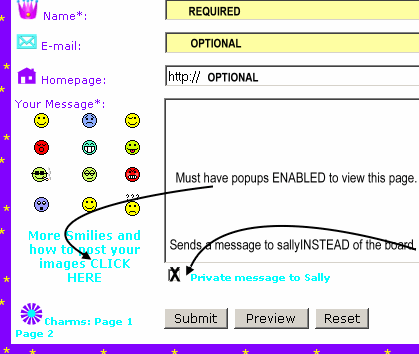
Q) I can't get the SMILIES page link to work. What am I doing wrong?
A) You must have popups enabled (and if the page is already open on your desktop, it won't
reopen, so be sure to close it or check your desk top for the already opened page).
You CAN open the link directly if you like (bookmark it in your favorites for easy
viewing) Here's the link:
http://www.wowsie.com/advancedguestbook/lang/codes-english.php
BACK TO TOP
Q) What information is required to post?
A) Just your NAME and MESSAGE. Everything else is optional
|
Q) Why can't I use HTML
anymore?
A) HTML has been disabled because I think AGcode is easier, and there is less chance of
the guestbook being compromised by incorrect scripting errors.BACK TO TOP
Q) Why does my smilie go to the end of the post?
A) It depends on where you curser (mouse) is at the time you click or type the smilie
code. You can just click or type the code in as you type your post. BACK TO TOP
Q) I don't understand AGCode. What is it?
A) It's simple, but it is different from HTML. Here's the details:
|
| Of Note You must not use both HTML and AGCode to do the same function. Also note that the AGCode is not case-sensitive (thus, you could use [URL] or [url]). BACK TO TOP Incorrect AGCode Usage: [url] www.proxy2.de [/url] - don't put spaces between the bracketed code and the text you are applying the code to. [email]webmaster@proxy2.de[email] - the end brackets must include a forward slash ([/email]) |